
.png?width=55&height=41&name=conosco_icon_lightbg%20(1).png "conosco_icon_lightbg (1)")
by Andrew Mabbitt on Jun 17, 2026
Vibe Coding is Shipping Vulnerabilities to Production. Here's the Proof.
A penetration tester's breakdown of what AI-generated code actually looks like under a scanner.
I've been doing offensive security for a long time. I've broken into banks, hospitals, government networks and SaaS platforms. I've sat in rooms with CTOs and explained, politely, that their login page was wide open. In all that time, the thing that's made my job easiest has consistently been developer speed - specifically, the gap between "it works on my machine" and "it's actually secure."
Vibe coding is going to make that gap a canyon.
If you're not familiar with the term, Andrej Karpathy coined it in February 2025: the practice of describing what you want to an AI assistant, accepting the output with minimal review and shipping it. "I just see stuff, say stuff, run stuff, and it mostly works." Over four million people watched that tweet. A movement was born.
And look - I get it. The productivity gains are real. JetBrains' 2025 State of Developer Ecosystem data shows nearly 90% of developers using AI tools save at least an hour a week, with around 20% saving eight hours or more. When you're a startup racing to ship, those numbers are genuinely compelling.
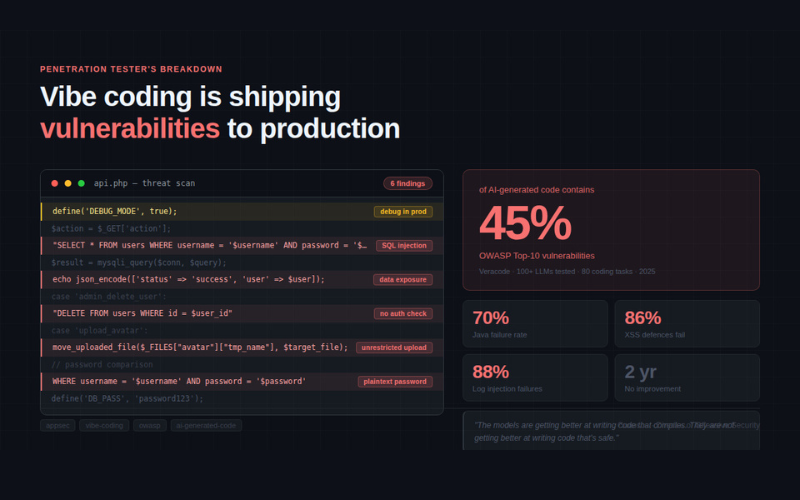
But here's what the productivity pitch doesn't tell you: Veracode tested over 100 large language models across 80 coding tasks and found that 45% of AI-generated code contains OWASP Top-10 vulnerabilities. Two years of model improvements haven't moved that number. The models are getting better at writing code that compiles. They are not getting better at writing code that's safe.
Java hit a 70% failure rate in their testing. Cross-site scripting defences failed 86% of the time. Log injection, 88%.
I'm going to show you exactly what this looks like in practice.
The Scenario: A PHP User Management API
I want to walk through something realistic - not a toy CTF challenge, but the kind of application a non-developer founder or a junior engineer might actually prompt into existence. Someone building a small SaaS, a client portal or an internal tool.
The prompt they gave the AI was something like:
"Build me a PHP user management API. Users should be able to register, log in, update their profile and upload a profile picture. Admins should be able to delete users. Connect it to a MySQL database."
Here's roughly what comes back. I've cleaned it up slightly for readability, but this is representative of real AI-generated PHP in my experience:
The Vibe-Coded Output
This application "works." A developer can spin it up, click through the functionality and it behaves as expected. The AI even added comments. From the outside, it looks like a completed feature.
From where I'm sitting, it's a gift.
Vulnerability Breakdown
Let me walk through what I actually see when I look at this code. This is the same mental model I'd apply on an engagement.
1. SQL Injection - Login, Search, Update and Delete
The entire database interaction is built on string-interpolated queries. Let's start with the login:
Classic. The username ' OR '1'='1' -- bypasses authentication entirely. No credentials required. But it gets worse - because the query selects *, the API then returns the entire user row in the JSON response, including the password field (which we'll get to). The attacker doesn't just get in; they get told who they logged in as and all associated data.
The search endpoint is equally broken:
A search for %' UNION SELECT table_name,2,3 FROM information_schema.tables-- - will dump the database schema. From there, it's a short walk to full data exfiltration. UNION-based injection on a LIKE clause is textbook - any halfway decent SQLMap run will own this in under a minute.
The update_profile case doesn't validate that the user_id in the POST body actually belongs to the logged-in user. I can update any user's profile by sending user_id=1 in my request. If I'm a normal user, I can rewrite the admin's email address and trigger a password reset to a mailbox I control. That's account takeover via an update endpoint - the kind of business logic flaw that static analysis tools frequently miss.
2. Broken Access Control - The Admin Endpoint
There is no authentication check here. There is no session validation. There is no role check. Anyone who knows the endpoint exists can delete any user in the system by hitting api.php?action=admin_delete_user&user_id=1.
The route is named admin_delete_user, which presumably gave the developer (and the AI) confidence that it was "the admin one." But naming a route isn't access control. This is IDOR combined with zero authorisation - a P1 on any bug bounty programme.
And because user_id is interpolated directly into the query: ?action=admin_delete_user&user_id=1 OR 1=1 deletes every user in the database. One request. The entire user table, gone.
3. Unrestricted File Upload - Remote Code Execution Waiting to Happen
No extension validation. No MIME type checking. No size limits. No randomisation of the filename. The file is placed into a web-accessible directory with its original name intact.
I upload a file called shell.php containing <?php system($_GET['cmd']); ?>. I then visit https://target.com/uploads/shell.php?cmd=id. I now have remote code execution on the server. From there: read the config.php file with hardcoded database credentials, dump the database, pivot to internal network services and start looking for lateral movement paths.
This is a complete compromise from a single HTTP request. The AI didn't make a subtle error here - it made the worst possible architectural decision for a file upload handler.
4. Hardcoded Credentials and Debug Information Disclosure
Using the root database user is bad practice even in development - it means the web application has every privilege on the database server, including FILE operations that let you read and write arbitrary files on disk. But the real problem is that config.php will likely end up in a git repository, and from there it's one .env scan away from being leaked.
The debug mode disclosure is its own issue:
An attacker who hits an unknown action gets the full $_SERVER superglobal - which includes the document root, server software version, environment variables (potentially including other API keys or secrets) and the current session state. This is the kind of reconnaissance goldmine that turns a blind enumeration phase into a targeted attack in minutes.
5. Passwords Stored and Transmitted in Plaintext
There's no hashing anywhere in this codebase. The login query compares the raw submitted password directly against what's in the database, which means passwords are stored in plaintext. The login success response also echoes the entire $user row back to the client - including the password column.
So we have: plaintext storage, plaintext transmission in the response body and a SQL injection that lets us retrieve it all anyway. A breach of this database is a credential dump that can be used against every other service the users have accounts on.
6. No CSRF Protection
The update and delete operations use GET parameters for state-changing actions, and the POST endpoints have no CSRF tokens. A malicious page visited by a logged-in user can silently trigger profile updates, deletions or uploads via cross-site requests. This isn't a hypothetical - it's a one-liner in a phishing email or a forum post.
Why AI Gets This Wrong (And Why It's Not Getting Better)
This isn't a failure of the underlying model's intelligence. The AI knows what SQL injection is. It can explain prepared statements in detail. Ask it "how do I prevent SQL injection in PHP?" and it'll give you a perfectly accurate answer about PDO and parameterised queries.
The problem is the workflow. When you prompt "build me a user management API," the model's primary optimisation target is producing working, demonstrable code. Security is a constraint that has to be explicitly specified - and most vibe coders don't specify it, because they don't know what to ask for.
Research out of the University of Virginia sharpened this picture further: AI agents perform reasonably well on well-known bug classes like SQLi and XSS when they're the obvious focus of a code block. But they fail badly on authorisation logic and business logic - the kinds of flaws that require understanding what the application should do, not just what it can do. Claude generated PHP code that deleted products without checking user authentication. Most agents allowed users to order negative quantities. These aren't clever attacks; they're basic functionality assumptions that any senior developer would make automatically.
The generated code works. The security model was never discussed.
The Better Prompt
Here's what most "vibe coding is dangerous" posts miss: the prompt is the specification. You can significantly reduce the security surface by being more explicit upfront. Security research - including work our team at Conosco references in our engagements - has found that self-reflection (asking the model to review its own output for security issues) can reduce insecure code generation by up to 50% depending on the model and language.
That's meaningful, but it means up to half the insecure patterns can still slip through even with mitigations. This is a tool for reducing risk, not eliminating it.
With that caveat firmly in place, here's a PHP-specific security prompt you can use as a system prompt or prefix to your feature requests:
You are a PHP security expert. When generating PHP code, you MUST enforce the followingsecurity requirements without exception:DATABASE:- Use PDO with prepared statements and parameterised queries for ALL database interactions. Never interpolate user input into SQL strings.- Never use the root database user. Assume a least-privilege application user.- Always handle PDO exceptions explicitly; never expose raw database errors to users.AUTHENTICATION & SESSION:- Hash all passwords using password_hash() with PASSWORD_BCRYPT or PASSWORD_ARGON2ID. Verify with password_verify(). Never compare plaintext passwords.- Validate session state at the start of every endpoint that requires authentication.- Check the user's role against the required permission before executing any privileged action.- Never expose session data, $_SERVER contents, or internal paths in error responses.AUTHORISATION:- For every resource modification (UPDATE, DELETE), verify that the authenticated user owns or has explicit permission to modify the target resource. Never trust a user-supplied ID without cross-referencing the session.- Admin-only routes must explicitly verify $_SESSION['role'] === 'admin' before executing.FILE UPLOADS:- Validate file extension against an explicit allowlist (e.g., jpg, png, gif, webp only).- Validate MIME type using finfo_file(), not the client-supplied MIME type.- Generate a random filename using bin2hex(random_bytes(16)) and append the validated extension.- Store uploads outside the web root or behind a controller that streams files with proper headers.- Enforce a maximum file size limit.INPUT & OUTPUT:- Sanitise all data output to HTML contexts with htmlspecialchars($val, ENT_QUOTES, 'UTF-8').- Validate all input against expected types, lengths and formats before use.- Include CSRF token validation for all state-changing requests (POST/PUT/DELETE).- Set security headers: X-Content-Type-Options, X-Frame-Options, Content-Security-Policy.CONFIGURATION:- Never hardcode credentials. Use environment variables.- Disable debug output and error display in any code intended for production or review.- Set error_reporting(0) and log_errors to a file, not stdout.After generating each code block, review it against these requirements before presenting it.If you identify any deviation, correct it before output.

Now let's see what the same application looks like when this prompt is in play.
The Secured Version
What Changed and Why It Matters
To be explicit about the delta:
SQL Injection - Eliminated. Every query now uses PDO prepared statements with bound parameters. The user-supplied value is never concatenated into the SQL string at any point. The database driver handles escaping entirely.
Broken Access Control - Fixed at two levels. The require_auth() helper validates session state on every protected endpoint. The require_admin() helper explicitly checks the role. Critically, the update_profile case no longer accepts a user-supplied user_id - it uses the authenticated session's ID directly, preventing horizontal privilege escalation.
Unrestricted File Upload - Validated and contained. The upload handler now validates MIME type via finfo (not the client-supplied Content-Type header), validates the extension against an explicit allowlist, generates a random filename and stores the file outside the web root. An attacker uploading shell.php gets a 415 and nothing else.
Hardcoded Credentials - Removed. Credentials come from environment variables. The database connection uses a least-privilege application user rather than root. PDO errors are logged internally, not echoed to the client.
Information Disclosure - Closed. The default case returns a generic 400 response. No $_SERVER, no $_SESSION, no internal paths.
CSRF - Protected. All state-changing endpoints validate a CSRF token tied to the session. Tokens are generated with random_bytes() and compared with hash_equals() to prevent timing attacks.
Password Handling - Bcrypt. password_hash() and password_verify() handle hashing. The plaintext password is never stored or returned.
The Self-Reflection Trick
One practical technique worth implementing immediately: after you get a code block back from an AI assistant, feed it back in with a security review prompt. Security research - including work our team at Conosco references in engagements - has found this approach can reduce insecure code generation by up to 50% depending on the model and language.
That's meaningful, but it means up to half the insecure patterns can still slip through even with this in place. It's a risk reduction tool, not a silver bullet.
Your follow-up prompt should look something like this:
Review the code you just generated for security vulnerabilities. Specifically check for:- Any user input used directly in SQL queries, shell commands, or file paths- Missing authentication or authorisation checks on state-changing operations- File upload handlers that don't validate type, extension, or destination- Hardcoded credentials, API keys, or sensitive configuration- Error handling that might disclose internal state, paths, or stack traces- Missing CSRF protection on POST endpoints- Any use of eval(), exec(), system(), or similar dangerous functionsFor each issue found, explain the attack scenario and provide the corrected code.
This won't catch everything - static analysis of logic errors and business rule violations is genuinely hard for LLMs - but it's a meaningful first pass that costs you thirty seconds.
For Everyone Else: Prompts That Don't Require a Security Background
Everything above assumes you've got enough PHP knowledge to recognise a prepared statement from a string-interpolated query. A lot of people building with AI tools right now don't - and that's exactly the population vibe coding was designed for.
This section is for them, and for the technically-minded people who work alongside them.
The good news is that you don't need to understand the mechanics of SQL injection to meaningfully reduce the chance that your AI-generated code contains it. You just need to know what to ask for. The prompts below require zero coding knowledge. Copy them, adapt them and make them part of your standard workflow.
The "Security-First" Starter Prompt
Use this before you describe your feature. Paste it at the start of your conversation, or set it as the system prompt in your tool of choice.
Before writing any code for me, I want you to treat security as a first-class requirement - not an afterthought. Specifically:

- Assume any data coming from a user, a URL, or an external source is potentially malicious. Never use it directly in a database query, a file path, or a system command.
- Every endpoint or page that requires a logged-in user must check that the user is actually logged in before doing anything.
- Never store passwords in plain text. Use modern, industry-standard hashing.
- Never put API keys, passwords, or credentials directly in the code. Use environment variables or a secrets manager.
- Don't show detailed error messages to users - log them privately instead.
- Apply the OWASP Top 10 as a baseline standard throughout.

When you generate code, tell me which of these principles you've applied and flag anything you're uncertain about.
This one prompt won't make AI-generated code bulletproof. But it shifts the model's optimisation target from "working" to "working and defended." In our experience, even this level of instruction meaningfully changes the output.
The OWASP Top 10 Prompt
If you want to be more specific without getting technical, use the names of the vulnerability classes. You don't need to understand them in detail - the AI does.
Build this with the OWASP Top 10 (2021) in mind. Specifically, I want you to defend against:

 1. Broken Access Control       - make sure users can only access and modify their own data
 2. Cryptographic Failures      - encrypt sensitive data, hash passwords properly
 3. Injection                   - never put user input directly into database queries or system commands
 4. Insecure Design             - think about what could go wrong, not just what should go right
 5. Security Misconfiguration   - no default credentials, no debug mode in production,
                                  no unnecessary features enabled
 6. Vulnerable Components       - use current, maintained libraries
 7. Authentication Failures     - secure login, session management and password handling
 8. Data Integrity Failures     - validate data from external sources
 9. Logging and Monitoring      - log security events, don't expose logs to users
10. Server-Side Request Forgery - don't let users make the server fetch arbitrary URLs

After generating the code, walk me through how you've addressed each of these.
This works well at the start of a new project. It doesn't require you to know what SSRF is - the AI does, and now it knows you care about it.
The "Recently Exploited Vulnerabilities" Prompt
Particularly useful if you're building something that will handle real user data or sit on the public internet.
Before and after generating this code, consider the most commonly exploited web application vulnerabilities from the past 12 months. These have included:

- Authentication bypass via logic flaws (not just SQL injection - subtle broken auth)
- Insecure Direct Object References (IDOR) - users accessing other users' data by
  changing an ID in a URL or request
- Mass assignment vulnerabilities - APIs accepting more fields than intended
- Broken object-level and function-level authorisation in REST APIs
- Server-Side Template Injection (SSTI) in apps using templating engines
- Path traversal in file handling code
- Race conditions in payment or privilege-change flows

Apply defences against these in your generated code. If any of these patterns are particularly relevant to what I've asked you to build, flag them explicitly.
You can keep this prompt fresh by asking the AI itself: "What are the most commonly exploited web application vulnerabilities right now?" and pasting the answer back in. It becomes a living document.
The "Review What You Just Built" Prompt
Even if you didn't use any of the above during development, you can still run a security pass after the fact. Copy your generated code and send it with this:
Review this code for security vulnerabilities. You don't need to rewrite it yet - just tell me:

1. What are the most serious security issues?
2. Which ones could let an attacker access data they shouldn't?
3. Which ones could let an attacker take actions they shouldn't?
4. Are there any that could take the application completely offline?
5. Rate each issue as Critical, High, Medium or Low.

Explain each issue in plain English - assume I'm not a security expert. Then, once you've listed them, fix them one at a time and explain what you changed and why.
The "plain English" instruction matters. Without it, models tend to produce technically accurate but opaque explanations that non-developers can't act on.
A Note on What These Prompts Can't Do
I want to be honest here, because the security community gets burned whenever we oversell a mitigation.
These prompts will meaningfully improve the baseline security of AI-generated code. They will not replace a code review by someone who knows what they're looking at. They will not catch subtle business logic flaws - the ones where a user can order negative quantities, submit a price of £0.00, or access another organisation's data because the tenant check was forgotten on one endpoint.
Those classes of vulnerability require understanding what the application should do. They require threat modelling. They require someone asking "what would a malicious user try here?" - and that question is hard to prompt your way out of.
The prompts above are a floor, not a ceiling. If you're building something that handles real user data, payments, health information or anything regulated, get a professional to look at it. That's not a sales pitch - it's the same advice I give my own clients.
What AppSec Teams Need to Do Right Now
The production reality is that your developers are already vibe coding. The 45% vulnerability rate isn't a future risk; it's in your current codebase.
The highest-value interventions from where I sit:
Integrate SAST into the PR pipeline, not the IDE. Developers will dismiss IDE warnings under time pressure. A CI gate that blocks merges on critical findings is harder to ignore. Tools like Semgrep, CodeQL and Snyk have decent coverage of the injection and authentication patterns that AI gets wrong most often.
Mandate security review ownership on high-risk code. Auth flows, payment handling, file operations and admin APIs should require sign-off from someone who knows what IDOR is. "The AI wrote it" is not a review.
Run threat modelling on AI-generated architectures. The University of Virginia research found that agents lack the contextual understanding to grasp that "users shouldn't be able to modify other users' orders." These are systemic design flaws, not individual code bugs. A brief threat model session - even a whiteboard exercise - surfaces the authorisation model that needs to be explicitly specified.
Test for business logic explicitly. Your automated scanner will find the SQLi. It will not find "user can submit a negative quantity and receive a refund." Add business logic abuse cases to your test plans, particularly for anything touching money, access levels or data ownership.
Consider .cursorrules or equivalent. If your team uses Cursor, Cline or similar agentic IDEs, a project-level security rules file that codifies your secure coding requirements is a low-effort, high-value control. Research has shown that codifying expectations directly into the development environment leads to proactively safer code generation - and the self-reflection prompts above work just as well inside an agentic IDE as they do in a standalone chat.
The Uncomfortable Bottom Line
Vibe coding is not going away. The productivity argument wins in most organisations, and frankly it should - the tools are genuinely useful when handled properly. But "mostly works" and "secure" are not the same thing, and in security they never have been.
The code I showed above would pass most functional QA. It would pass a demo. It would get shipped to production at a hundred startups this week. And it would be exploitable from the first day it's live.
The vulnerability isn't in the AI. It's in the workflow that treats "it compiles and the demo works" as the definition of done. We've spent twenty years trying to shift security left; vibe coding is a hard pull in the other direction.
The fix isn't to stop using AI coding tools. It's to treat AI-generated code the way you treat code from a very fast, very confident junior developer who has never heard of OWASP: useful as a starting point, dangerous as a finished product.
Review it. Test it. Run it through a scanner. And maybe, just once, ask the AI what it thinks is wrong with what it just wrote.
Speak to an expert today on vulnerabilities in your vibe-coded environments
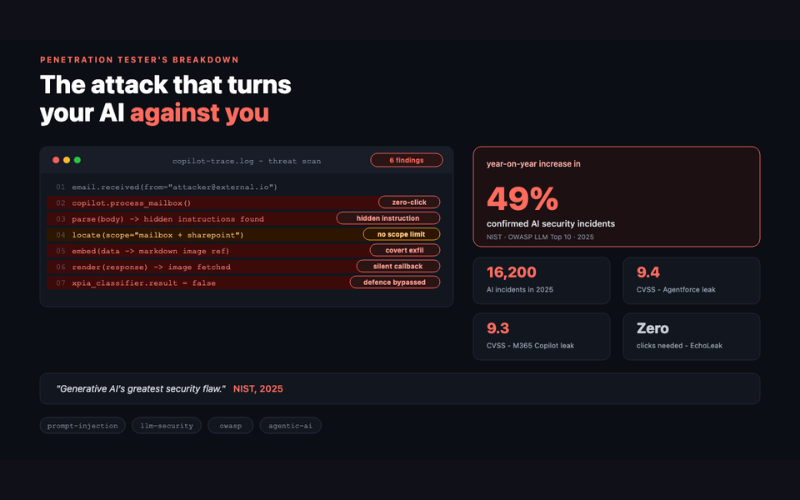
Prompt Injection - the attack that turns your AI against uou
Why OWASP's #1 LLM vulnerability is already inside your organisation, and what to do about it. There's a category of att …

Become PCI DSS v4 Compliant with Conosco EDS
The Payment Card Industry Data Security Standard (PCI DSS) is an internationally recognised information security standar …

What to Look For When Choosing IT Consulting Firms
Introduction So you’ve made the decision to hire an IT consulting firm. Maybe you’re the head of a small startup who wan …

.png?width=220&height=165&name=image%20(4).png)